Vertical clips that
follow the speaker.
A wide podcast shot cropped to vertical usually loses someone. MasterClip works out who is talking from moment to moment and keeps that person in frame, so your clips look like an editor cut them by hand.
 Your video
The frame moves to whoever is talking
Not to the middle of the shot and not to the biggest face. In a two-person show it cuts to whoever has the floor, and it can split the screen when both are talking.
Center crop loses people
Most podcasts are filmed wide, with two people sitting apart. Crop the middle to vertical and you get an empty chair or half a face.
Empty chairs, half a face, the speaker off screen.
The person talking, filling the frame.
Pick a layout per video
Auto picks per moment. Speaker focus keeps one person full screen. Framed wide keeps the whole shot with a headline on top. Split screen stacks both people.
Try it free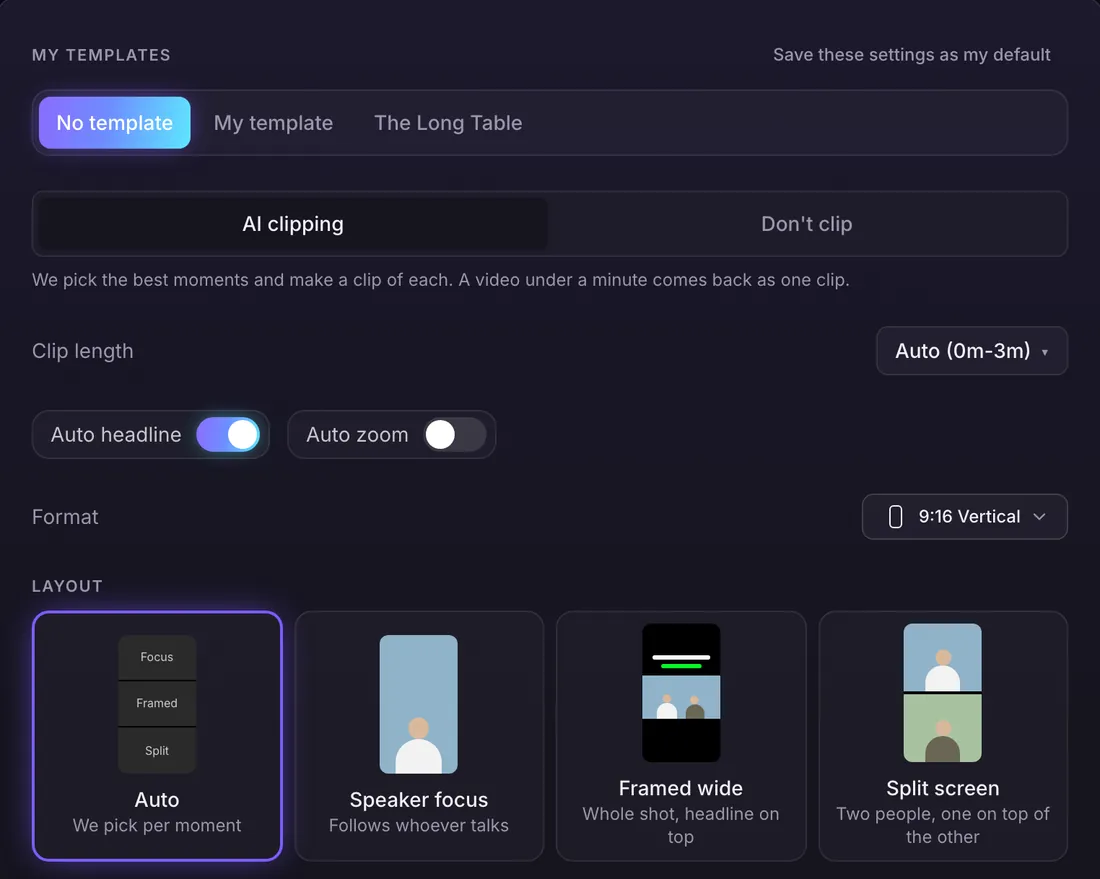
Follows the voice
The frame moves to whoever is speaking, not just to the biggest face on screen.
Splits when both talk
When two people talk over each other, the clip can stack them top and bottom.
One camera or two
Works on a single wide shot and on videos that cut between cameras.
Every shape
Vertical 9:16, square 1:1 and portrait 4:5 clips all follow the speaker.
Fix the framing in the editor
In the clip editor, set the framing to Auto, Fill or Fit, change the layout, or turn the tracker off for a clip. Saving costs no credits.
Questions
What is AI speaker tracking?
It moves the frame of a vertical, square or portrait clip to whoever is talking, moment by moment, so the speaker stays in the shot when a wide video is cropped.
Does it work with two cameras?
Yes. It works on one wide shot and on videos that cut between cameras. The person talking stays in frame.
Can I turn it off?
Yes. In the clip editor you can set the framing to Auto, Fill, Fit or turn the tracker off.
What about wide 16:9 clips?
A wide clip shows the whole picture, so there is nothing to track.
Is MasterClip free?
Yes. The Free plan gives you 30 minutes of video a month with no card. Free clips carry a small watermark and are deleted after 3 days, so download the ones you want. Paid plans start at $7 a month.
More of what it does
Clips shown were made by MasterClip from Anabaptist Perspectives Ep. 159 (CC BY 3.0) and Mike Herrera Podcast #361 (CC BY). The brand and its logo are made up for the example.
Clip it
like a master
30 free minutes a month. No card needed.